Showing posts with label Azure App Service. Show all posts

Delete user level FTP credentials in Azure app service


Delete user level FTP credentials in Azure app service

Issue:

  • How to delete user level FTP credentials?

Solution:


There are 2 types of deployment credentials in Azure app services,

  • User Level credentials
  • App Level credentials

User level credentials are for entire Azure account which can be used to deploy to any web app for the subscription,

while App Level credentials are web app specific and can't be used with any other web app. App Level credentials are generated automatically at app creation. Users can’t control this manually.


You can get more information in below URL,

https://azureappservices.blogspot.com/2020/02/everything-about-azure-app-service-ftp.html

https://azureappservices.blogspot.com/2019/02/web-app-multiple-ftp-users-i-noticed.html


Here we will focus on user level credentials only as app level credentials can be reset through the portal however when you create user level credentials you can either change the password or create a new user level credentials which overwrites the previous one but what about “deleting the user level credentials” after creating.


There is no direct option available in the Azure portal to delete user level credentials.


You can check in below screen shot.


·       If you create a new username then previous one will be invalid.

·       If you type new password, then previous password will not work.

·       There is no option to delete already existing user credentials.


The hack to delete user credentials is,

·       Open azure portal and click on cloud shell

·       Select bash environment.

·       Run following CLI command,


az webapp deployment user set --user-name ""  --password ""


Here you are setting username and password as blank which is kind deleting username password.


That’s all, you are done here.

If you want to regenerate user credentials then you can again create it which has nothing to do with you previous user credentials..


Hope this helps.

Azure app Service | New way to handle configurations


Azure app Service |New way to handle configurations


Azure App Configuration

Issue:
·       I have 20 app services or components, and all are using same configuration e.g. connection string or any other key/value pair.
·       Why should I store same things in 20 apps?
·       Can I store it in some central repository and access it?
·       The challenges it to keep my setting in various places in today’s distributed architecture.

Solution:

One solution of all these issues is the new feature which is App configuration.

You can login to Azure portal and search for App Configuration.

App configuration


It’s very easy to create through Azure portal.


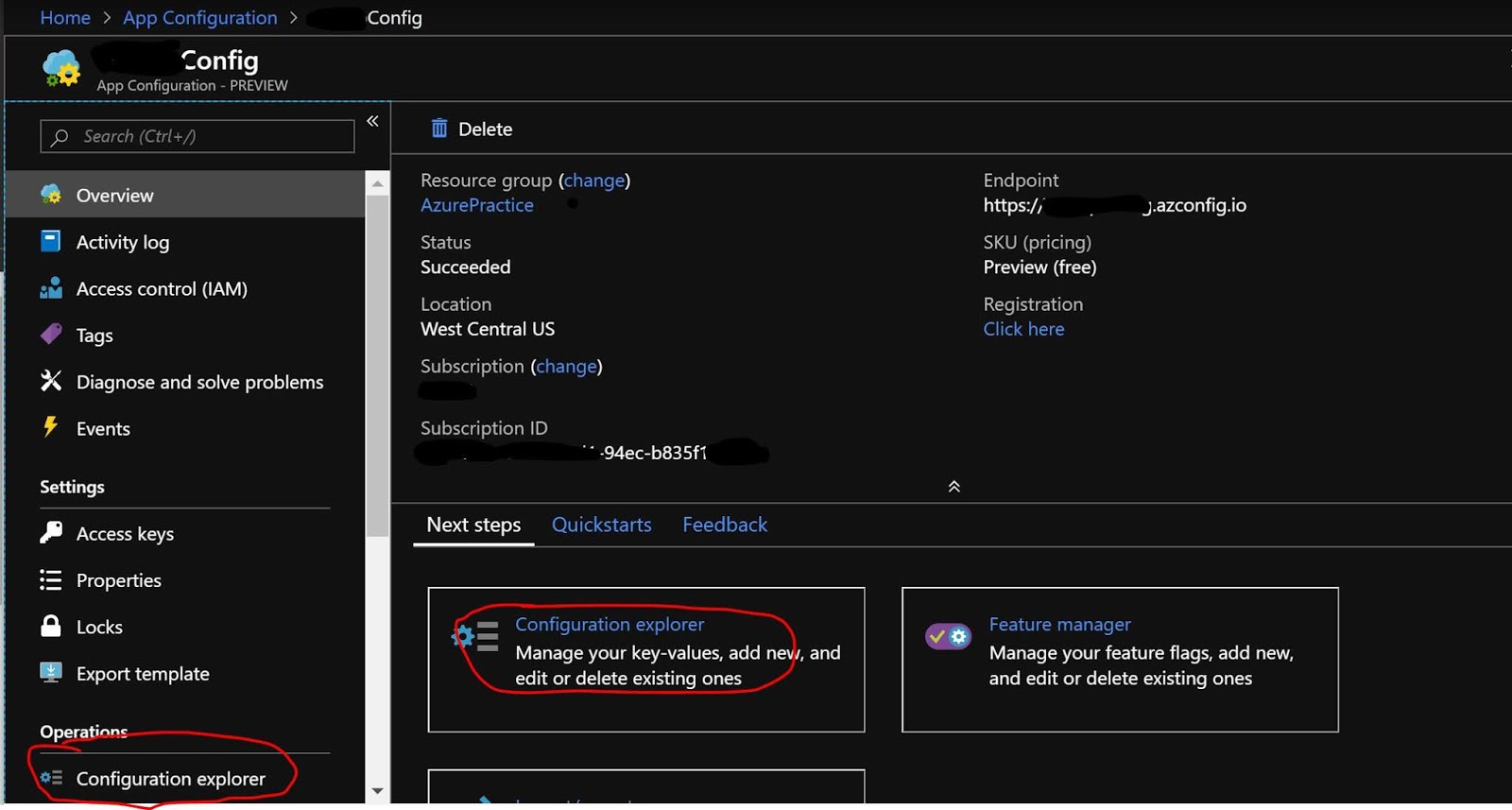
Once you create a new App Configuration then you can see it’s basic information in the overview blade.

The most important part is “Configuration explorer” which helps you to create/Modify/delete the app settings or configuration.

App Configuration


It’s very easy to create key/value pair.


Once you are done with it, you can refer “Access Key” section to get the access key which can be used in your application to access the app configuration.


It has lot of other good features like,
·       Import/Export app configuration in/from
o   Config File
o   Other Apps
o   Another App Configuration
·       You can keep track of what has changed.
·       You can compare and restore your settings.
·       You can create it with ARM template also.

It provides the SDK also which you can use in your code to handle everything.

I hope this helps.

Please refer below URLs for more details,


Subscribe to Azure App Services Announcements | Azure outage


Subscribe to Azure App Services Announcements 


is there any Azure outage?

Issue:
·       How can I get the auto notification for any changes/update in Azure App Service?
·       Can I get email/notification for any new feature in azure app service?
·       How can I know about breaking changes in azure app service?
·       Is there any Azure outage going on?

Solution:

I discovered how we can get automated notifications from Azure App Services team on the latest announcements. So if you ever wondered about the question “How can we be notified for any new announcement(Major) in Azure App Service?” – please continue reading.

As you are aware, Azure App Service team is continuously enhancing the product based on user’s feedback/requirement/Issue but how to get the notification for the new changes or ongoing issues.
Below are the steps to proactively get notified about the latest announcements sent by Azure App Service Engineering team.

How to subscribe to App Service Announcement:

Step 1: click on below URL which is for both “web app” and “Azure functions”.


Step 2:  click on Watch icon. You may have to login. If you don’t have GitHub account please create one.


Step 3: Once you click on Watch, it will convert to Unwatch


That’s all, you are done.

Now you will start receiving communication for all the Major enhancement.

You can see the list of all announcement,


If you want to know about the Azure outage in any specific reason then you can check below URL,
Azure team keep updating their status on this page which helps users to understand if any issue is going on or not,


I believe this helps. Please share your query/feedback.

Other useful references,


Issue: Azure function is throwing one of the following exceptions
·       Unable to retrieve Functions Keys
·       We are not able to retrieve the keys for function
·       The function runtime is unable to start.
·       Function host is not running.
·       Internal Server error.
·       Service Unavailable.


Issue: Azure Functions: The Consumption pricing tier is not allowed in this resource group


Issue: Disable Azure functions